


A profile picture is one of the first visual elements people notice when they interact with someone on a messaging platform. On WhatsApp, a well-selected display picture can communicate personality, mood, interests, or even a professional identity without requiring a written introduction. For users who want to understand how profile images appear in different social contexts, a WhatsApp DP Viewer can be considered as part of broader profile-picture awareness.
Choosing the right display picture is not simply about selecting the most attractive photograph. Lighting, background, facial visibility, image quality, privacy preferences, and the intended audience can all influence how a profile image is perceived. A thoughtful approach can make a profile look polished while still maintaining a comfortable level of personal privacy.
Understanding the Purpose of a WhatsApp Profile Picture
A WhatsApp display picture serves as a visual identifier. Friends, relatives, colleagues, and other contacts may use it to recognize an account quickly, especially when several people have similar names. Because the image occupies a relatively small space, simple and recognizable photographs often work better than complicated compositions.
The purpose of a profile image can also vary from person to person. Someone may want a casual picture for personal conversations, while another user may prefer a professional headshot for work-related communication. Some people choose landscapes, illustrations, pets, hobbies, or abstract designs instead of showing their face.
When exploring profile presentation through a WhatsApp DP Viewer, it is useful to remember that profile visibility depends on the platform’s privacy controls. A viewing tool should never be treated as a way to bypass someone’s privacy settings or access restricted content.
Choosing a Profile Picture That Looks Clear
Image clarity is one of the most important considerations when selecting a display picture. WhatsApp displays profile images in a small format, meaning fine details can disappear when the image is reduced. A photograph that looks excellent in a full-size gallery may therefore appear less effective as a small profile icon.
For better results, choose an image with a clear subject and sufficient contrast between the subject and background. Avoid photographs where the main person is positioned too far away or surrounded by excessive visual clutter.
Consider these practical qualities:
- Use a sharp, well-lit photograph.
- Keep the primary subject easy to recognize.
- Avoid extremely busy backgrounds.
- Check how the image looks after cropping.
- Choose a composition that remains attractive at a small size.
These simple adjustments can improve the overall appearance of a WhatsApp profile without requiring professional photography equipment.
Profile Picture Ideas for Different Personalities
The best profile picture should reflect the user’s purpose and personality. There is no universal style that works for everyone. A creative person may prefer an artistic portrait, while someone who enjoys travel might select a memorable destination photograph.
A few practical approaches include a natural outdoor portrait, a clean studio-style headshot, a favorite pet photograph, a minimalist illustration, or a scenic image connected to a meaningful experience. Users who prefer greater privacy can choose an object, landscape, graphic, or symbolic image instead of a recognizable personal photograph.
For people reviewing their own profile presentation with a WhatsApp DP Viewer, comparing different image styles can help reveal which composition looks most balanced and recognizable.
Matching the Picture With the Intended Audience
Your profile picture can communicate different messages depending on who sees it. A casual selfie may be appropriate for close friends but less suitable for someone who frequently uses WhatsApp for professional communication.
Before changing your picture, think about your primary audience. If colleagues, clients, classmates, relatives, and friends all appear in your contact list, a versatile image may be the most practical choice.
| Profile purpose | Suitable picture style | Useful consideration |
|---|---|---|
| Personal account | Natural portrait | Friendly and authentic appearance |
| Professional communication | Simple headshot | Clean background and good lighting |
| Creative identity | Artistic image | Reflects personality or interests |
| Privacy-focused profile | Landscape or illustration | Limits personal exposure |
| Travel-oriented profile | Scenic photograph | Highlights a memorable experience |
This approach makes profile-picture selection more intentional rather than simply changing the image whenever a new photograph becomes available.
Using Lighting and Background Effectively
Lighting can dramatically affect the quality of a profile photograph. Natural daylight usually creates a more balanced appearance, particularly when the subject faces a soft light source rather than standing under harsh overhead lighting.
Background selection matters as well. A plain wall, outdoor setting with gentle depth, or uncluttered room can keep attention on the main subject. Busy backgrounds containing many people, objects, or strong patterns can make a small profile image difficult to interpret.
Users experimenting with a WhatsApp DP Viewer should consider how the complete composition works at reduced size. The goal is not necessarily to create a technically perfect photograph, but to create an image that remains clear and visually meaningful when displayed as a profile icon.
Privacy Should Come Before Profile Design
Creative profile pictures are useful, but privacy should remain an important consideration. A profile image can reveal more information than users realize, including locations, workplaces, family members, school uniforms, vehicle details, or other identifiable surroundings.
Before uploading a photograph, inspect the background and consider whether it contains information you would rather keep private. It is also worth reviewing WhatsApp’s available privacy settings and deciding who should be able to see your profile photo.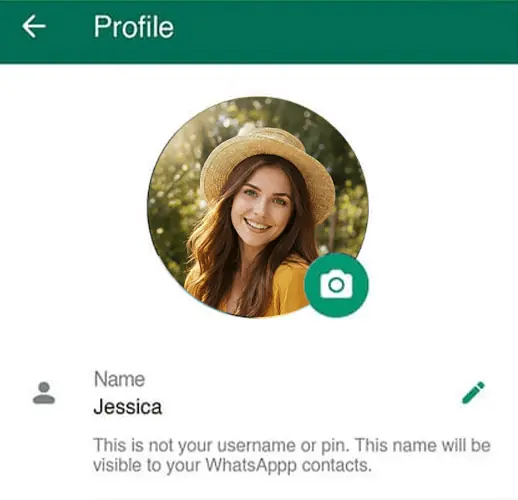
A WhatsApp DP Viewer should not be interpreted as permission to obtain or redistribute another person’s profile image. Respecting user-controlled visibility is an important part of responsible digital behavior.
Avoiding Common Profile Picture Mistakes
Even attractive photographs can perform poorly as profile pictures when they are selected without considering the platform’s format. One common mistake is choosing an image with the face or primary subject positioned too close to the edge. Circular or square cropping may remove important parts of the composition.
Another issue is excessive editing. Strong filters, artificial effects, or heavy retouching can make a picture appear unnatural. A profile photo generally works better when it remains recognizable and authentic.
Other mistakes include using very dark photographs, selecting outdated pictures that no longer represent the user, and repeatedly changing the image without considering how contacts may perceive the account.
Creating a More Consistent Social Profile
A profile picture does not exist independently from the rest of a user’s digital identity. The image can complement a status message, username, About section, and overall communication style.
For example, someone using WhatsApp for professional networking may benefit from a consistent visual identity across social platforms. A simple headshot, neutral background, and clear presentation can create a more recognizable presence.
Meanwhile, personal users can choose more expressive images that represent hobbies, celebrations, travel, nature, or everyday moments. The important factor is consistency with the intended purpose rather than following a single trend.
When a Profile Picture Needs an Update
A profile image does not need to be changed constantly. However, an update can make sense when the current picture is significantly outdated, poor quality, difficult to recognize, or no longer reflects the user’s preferences.
A useful review process is to look at the picture as though you were seeing the profile for the first time. Is the main subject immediately identifiable? Does the image remain clear when reduced? Is the background distracting? Does the photograph reveal information that should remain private?
These questions provide a practical way to evaluate a profile without relying entirely on trends.
Responsible Use of Profile-Viewing Tools
The term WhatsApp DP Viewer can refer to tools or concepts associated with examining profile-picture presentation. However, users should distinguish between legitimate profile visibility and claims that a third-party service can reveal restricted information.
Tools that promise access to private profile photographs, hidden information, or content that another user has deliberately restricted should be approached cautiously. Sharing or saving another person’s image without permission can also create privacy concerns.
For everyday users, the more useful approach is to focus on understanding profile presentation, privacy controls, image quality, and responsible online behavior rather than attempting to bypass access restrictions.
Practical Ways to Improve Your Next DP
Before selecting your next profile photograph, take a few minutes to compare several options. Look for the image that provides the clearest subject, most natural lighting, and least distracting background.
You can also crop the photograph differently to see whether the subject becomes more prominent. If the image is intended for professional communication, consider a simple composition with a neutral background. For personal profiles, choose something that feels genuine and reflects your current interests.
A WhatsApp DP Viewer may provide a useful reference point for thinking about how profile images are presented, but the final decision should always prioritize personal preference, privacy, and respectful digital interaction.
Conclusion
A strong WhatsApp profile picture does not require expensive equipment, complicated editing, or constantly changing trends. The most effective images are usually clear, recognizable, appropriately framed, and consistent with the user’s purpose.
Whether you prefer a portrait, landscape, illustration, pet photograph, or professional headshot, thoughtful selection can make your profile more distinctive. Using a WhatsApp DP Viewer as a concept for understanding profile-picture presentation can encourage users to think about visibility and appearance, but responsible use remains essential. Ultimately, the best profile picture balances personality with practicality. By paying attention to image quality, lighting, composition, audience, and privacy, social users can create a profile that feels authentic while maintaining sensible boundaries in the digital environment.
